
Get started in 5 simple steps
Setting up your Oryxen AI account is quick and straightforward. Follow these steps to generate your API key and start using our confidential computing platform.
Generate your API key
On the login page, click "Generate a new API key" to begin your secure setup.
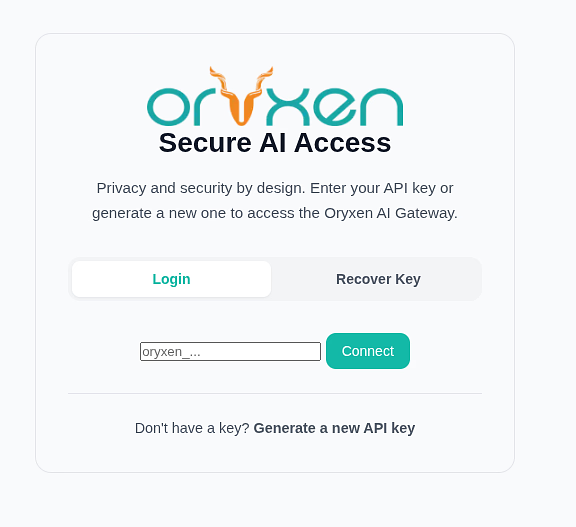
Understand why security matters
Your mnemonic phrase and API key are the foundation of your account security—learn why they matter.
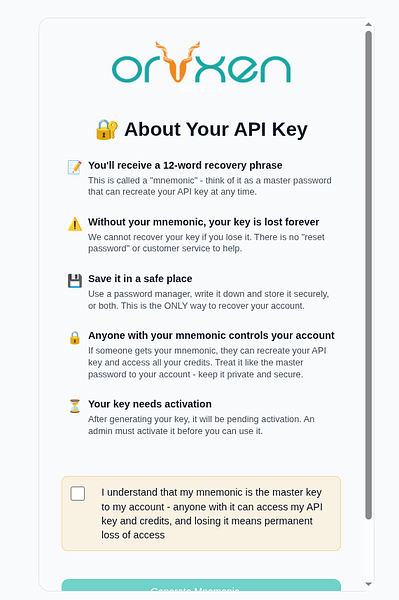
Secure your mnemonic
Receive your unique mnemonic phrase and a reminder to store it somewhere safe—this is your master backup.
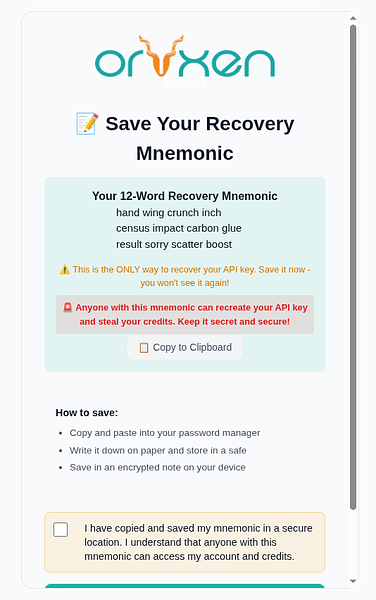
Get your API key
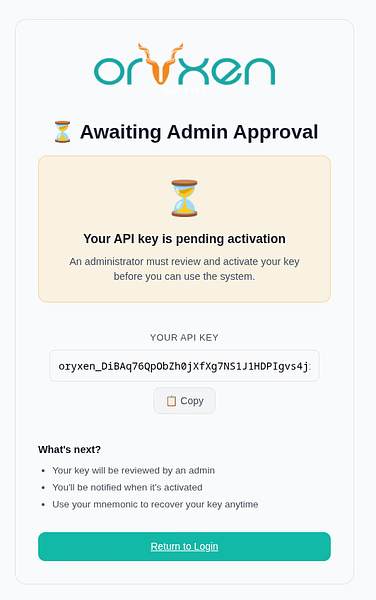
Your API key is revealed for the first and only time—copy it immediately and store it securely.
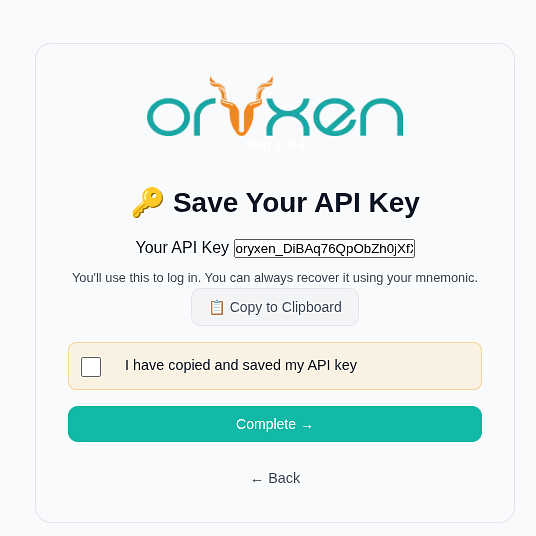
Activate your account
Select your preferred plan, complete the payment, and your API key is instantly activated and ready to use.
Logging In & Accessing Oryxen AI
Log in securely and start using Oryxen AI through our web chat or API.
Logging In
Go to the Oryxen login page: app.oryxen.ai/login.html
Enter your API key in the text box
Click Connect
Your messages are automatically encrypted
Browser Requirements
Chrome 104+ | Firefox 132+ | Safari 17.4+ | Edge 104+
If your browser is too old, you will see a warning and cannot log in.
The Sidebar
The sidebar on the left shows key areas:
Model Selector
A dropdown at the top lets you choose which AI model to use. Most of the models support text chat and documents analysis. Many have limited support for image analysis and optical character recognition (OCR). Vision models specifically are optimized for image/video analysis.
| Model Type | How to Identify | What You Can Do |
|---|---|---|
| Vision | Name contains "vl" or "vision" | Attach images 🖼️ |
| Chat | Everything else | Regular text chat and documents analysis |
Tip: If you want to send images, switch to a vision model first!
Token Usage
Two stat cards show your usage:
This Chat
Input and output tokens for the current conversation
Tokens
Remaining / Used Today / Monthly Used
Running low? Contact your administrator to add more tokens.
Using the Chat
The Chat Input Area
At the bottom of the chat area you will find:
Header Buttons
At the top of the chat area, the header contains:
| Button | What It Does |
|---|---|
| + New Chat | Clears messages, documents, and images |
| Export | Downloads the full chat as a Markdown file |
| Logout | Ends your session and clears encryption keys |
Sending a Message
Type your question in the text box (auto-expands up to 200px)
Press Enter or click the ➜ send button
The AI responds in the chat window
Message Features
- Assistant responses support Markdown, code blocks, tables, and math (LaTeX)
- Click the copy button on any completed assistant message to copy the raw text
- While the AI is thinking, you will see a spinner with "Oryxen is thinking" — no copy button appears during loading
⏰ Session Duration
Your session stays alive for up to 4 hours of inactivity. Any request to the server restarts the 4-hour clock, so you stay logged in while you keep working.
Attaching an Image (Vision Models)
You can send images to AI models that support vision:
Select a vision model from the dropdown (e.g., qwen2vl)
Click the 🖼️ image button next to the text box
Select an image file (JPG, PNG, GIF, WebP, etc.)
The image appears as a thumbnail above the text box
Type your question about the image and send
Why is the 🖼️ image button disabled?
If the 🖼️ image button is grayed out, hover over it — you will see:
"🎨 Switch to a vision model to attach images"
Select a model with vision capabilities from the dropdown.
Attaching Documents (RAG)
RAG = Retrieval-Augmented Generation
Attach documents and ask questions about their contents. The AI reads your files and bases its answers only on what you uploaded.
How to Attach a Document
Click the 📚 document button (books icon) next to the text box
Select one or more documents
Supported Formats
| Category | Formats |
|---|---|
| 📃 Office | PDF, Word (DOCX), PowerPoint (PPTX), Excel (XLSX) |
| 📝 Text | TXT, Markdown (MD), CSV, JSON, XML, YAML |
| 📊 OpenDocument | ODT, ODS, ODP |
| 🌐 Web | HTML, RTF |
Each document appears as a chip above the text box
Document Chip States
| State | Appearance | Meaning |
|---|---|---|
| 🔄 Processing | Teal dot | File is uploading and being embedded |
| ✅ Ready | Clean chip | Available for RAG context |
| ❌ Failed | Red text | Upload error — try again or remove |
RAG is automatically enabled when at least one document is ready
Type your question and send ➜
How it works: You only need to type your question. The AI sees your attached documents' content as background context and answers based on them. If the answer is not in your documents, the AI will say so clearly.
Removing Documents
| Action | How |
|---|---|
| Remove one | Click the × on a document chip |
| Delete from server | Immediate — no undo |
| Select multiple files | Hold Ctrl or Shift when clicking 📚 |
Privacy: Documents are private — only you can see them. They are isolated by your API key and deleted when you remove them.
Starting a Fresh Conversation
Click + New Chat in the header to clear everything:
New Chat clears:
- All messages
- All attached documents
- All attached images
You get a completely clean slate.
⏰ Also remember that your session automatically expires after 4 hours of inactivity — the server keeps you logged in while you work.
Support & Recovery
Recovering a Lost Key
If you saved your 12-word backup phrase but lost your API key:
Go to the Oryxen login page
Click the "Recover Key" tab
Enter your 12-word phrase exactly as written (order matters!)
Click Recover Key
Your API key appears — copy and store it safely
Critical: If you lost both your API key and your 12-word phrase, your account cannot be recovered.
This is by design — nobody, including administrators, can access your key or phrase.
Security Tips
Do This
- Keep your API key secret
- Write down your 12-word phrase on paper
- Log out when done (especially on shared computers)
- Keep your browser updated
Never Do This
- Share your API key
- Email your phrase
- Screenshot your phrase
- Reuse your key on other sites
Troubleshooting
"Invalid API key"
| Possible Cause | Fix |
|---|---|
| Missing oryxen_ prefix | Copy the entire key, including oryxen_ |
| Key not activated | Contact your administrator — key may still be PENDING |
"Encryption unavailable" warning
Fix:
- Update your browser
- Try a different browser
Details:
Chrome 104+ / Firefox 132+ / Safari 17.4+
Chrome, Firefox, or Safari recommended
Note: The browser must support WebCrypto API, we rely on this for safe cryptographic operations.
"No documents found" with RAG
| Check | Action |
|---|---|
| Still processing? | Wait for the teal dot to disappear (Ready) |
| Failed upload? | Remove the chip and try again |
| Vague question? | Use words that actually appear in the document |
"No embedding model available" tooltip
The document button is disabled because no provider with embedding models is configured.
Contact your administrator to add an embedding-capable provider, such as:
- Internal provider with embedding-model
- Any OpenAI-compatible provider with an embeddings endpoint
Image attach button is disabled
| Cause | Fix |
|---|---|
| Non-vision model selected | Switch to a vision model (e.g., qwen2vl) |
| Hover shows tooltip | "🎨 Switch to a vision model to attach images" |
Page keeps redirecting to login
Clear your browser cookies for the Oryxen website
Try logging in again with your API key
If it persists, contact us
Getting Help
| Issue Type | Who to Contact |
|---|---|
| Account issues (activation, lost keys) | Contact us |
| Technical problems | Check browser console (press F12) for error messages |
OryxenWeb v0.20.27 | OryxenProxy v0.18.5 | Tinia v0.8.5
User Guide
Download User Guide
Get the complete PDF for offline reading, detailed walkthroughs, and full screenshots.
DownloadRead User Guide Online
Browse the interactive HTML version with clickable table of contents and easy navigation.
Open Online GuideDevelop Quick Start
Get your first API call working in under 2 minutes. Oryxen provides an OpenAI-compatible API processed inside hardware-isolated Trusted Execution Environments (TEEs).
Base URL: https://api.oryxen.ai/v1
Authentication: Send your API key as Bearer <your-api-key> in the Authorization header
Copy-paste this cURL into your terminal:
curl https://api.oryxen.ai/v1/chat/completions \
  -H "Authorization: Bearer your-api-key-here" \
  -H "Content-Type: application/json" \
  -d '{
    "model": "oryxen-llm",
    "messages": [{"role": "user", "content": "Hello!"}]
  }'
Need More?
- Jump to Code Examples for Python, JavaScript, Go, Rust, and more
- Read the full API Guide for detailed endpoint documentation
Code Examples
import requests

API_KEY = "your-api-key-here"
BASE_URL = "https://api.oryxen.ai/v1"

response = requests.post(
    f"{BASE_URL}/chat/completions",
    headers={
        "Authorization": f"Bearer {API_KEY}",
        "Content-Type": "application/json"
    },
    json={
        "model": "oryxen-llm",
        "messages": [
            {"role": "user", "content": "Hello, how are you?"}
        ]
    }
)

print(response.json()["choices"][0]["message"]["content"])API Guide
Read API Guide Online
Browse the interactive HTML version with full endpoint documentation and integration examples.
Open API Guide