
Version: 1.0
Last Updated: 2026-04-28
Base URL: https://api.oryxen.ai/v1
Protocol: HTTPS, OpenAI-compatible where noted
The Oryxen AI platform provides a privacy-preserving API for chat
completions, model discovery, document retrieval (RAG), and token
management. It is OpenAI-compatible — existing clients
that work with /v1/chat/completions require minimal or no
changes.
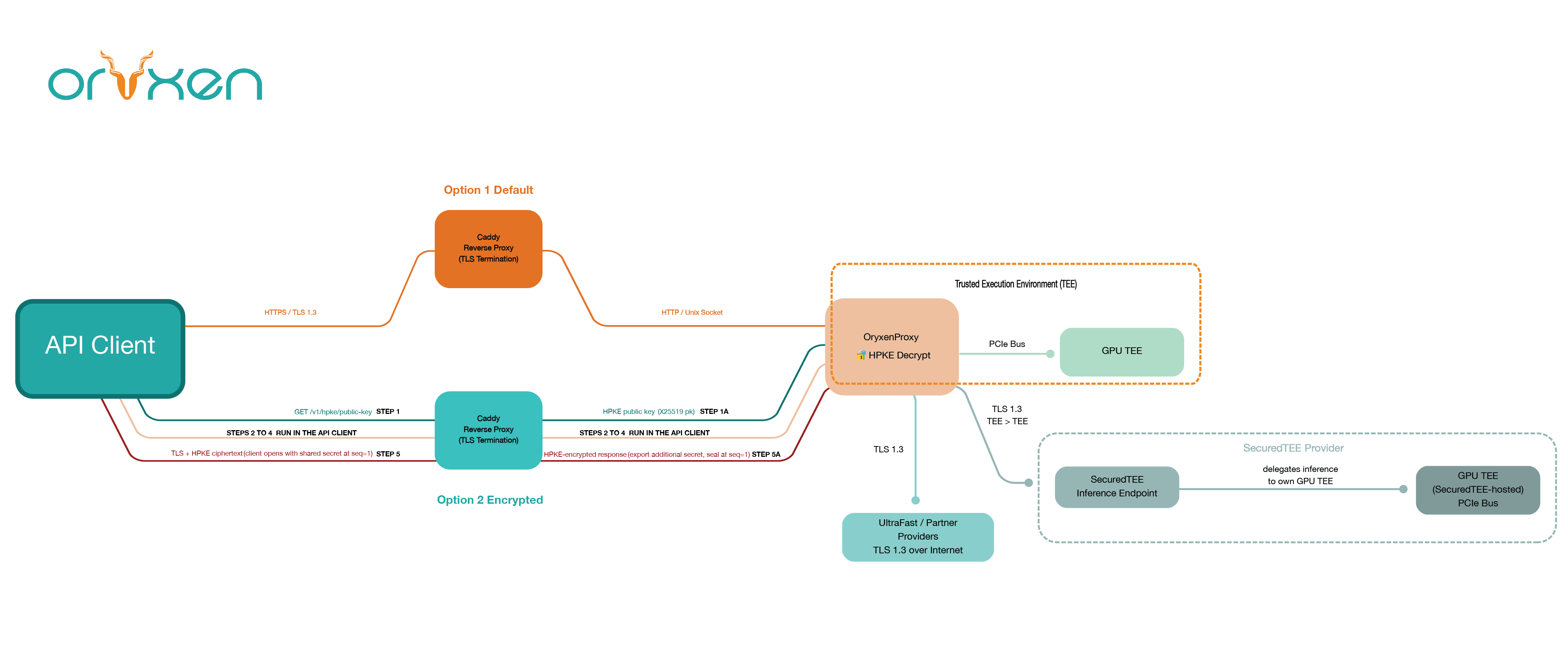
All inference runs inside verified TEEs (AMD SEV-SNP, Intel TDX). Your data is encrypted in transit and at rest. Optional HPKE end-to-end encryption ensures even the platform operator cannot read your prompts.
Two modes:
| Mode | Use When | Complexity |
|---|---|---|
| Plaintext (default) | Standard integration, prototyping, streaming | Low — drop-in replacement for OpenAI |
| HPKE Encrypted | Maximum confidentiality, compliance requirements | Medium — one-shot encryption per request |
All API requests require a Bearer token in the
Authorization header.
Authorization: Bearer oryxen_<your_api_key>Your API key is generated during onboarding at https://oryxen.ai.
GET /v1/models
Host: api.oryxen.ai
Authorization: Bearer oryxen_...
Required headers: -
Authorization: Bearer oryxen_... -
Content-Type: application/json (for POST/PUT)
Optional headers: -
X-HPKE-Enc: <base64_enc> — enables request/response
encryption (see HPKE section)
| Endpoint | Method | Auth | Description |
|---|---|---|---|
/v1/models |
GET | Yes | List available models |
/v1/chat/completions |
POST | Yes | Chat completion (SSE or JSON) |
/v1/tokens |
GET | Yes | Check token balance |
/v1/rag/documents |
POST | Yes | Upload a document |
/v1/rag/documents |
GET | Yes | List uploaded documents |
/v1/rag/documents/:id/delete |
POST | Yes | Delete a document |
/v1/hpke/key |
GET | No | Fetch server’s HPKE public key |
No extra encryption. Standard HTTPS carries the JSON payload. This is the recommended starting point.
cURL
curl -H "Authorization: Bearer oryxen_your_key" \
  https://api.oryxen.ai/v1/models
Python
import requests

resp = requests.get(
    "https://api.oryxen.ai/v1/models",
    headers={"Authorization": "Bearer oryxen_your_key"},
)
print(resp.json())
JavaScript
const resp = await fetch("https://api.oryxen.ai/v1/models", {
    headers: { "Authorization": "Bearer oryxen_your_key" },
});
const data = await resp.json();
console.log(data);
Go
req, _ := http.NewRequest("GET", "https://api.oryxen.ai/v1/models", nil)
req.Header.Set("Authorization", "Bearer oryxen_your_key")
resp, _ := http.DefaultClient.Do(req)
// decode JSON...
Rust
let data: serde_json::Value = reqwest::Client::new()
    .get("https://api.oryxen.ai/v1/models")
    .header("Authorization", "Bearer oryxen_your_key")
    .send().await?.json().await?;
Haskell
req <- parseRequest "GET https://api.oryxen.ai/v1/models"
let req' = setRequestHeader "Authorization" ["Bearer oryxen_your_key"] req
resp <- httpJSON req'
print (getResponseBody resp :: Value)
Julia
using HTTP, JSON3
resp = HTTP.get("https://api.oryxen.ai/v1/models",
    ["Authorization" => "Bearer oryxen_your_key"])
println(JSON3.read(resp.body))
Response:
{
  "data": [
    {
      "id": "local/chat-model",
      "object": "model",
      "pricing": { "input": 0.00, "output": 0.00 }
    },
    {
      "id": "securedtee/model-a",
      "object": "model",
      "pricing": { "input": 0.005, "output": 0.015 }
    }
  ]
}cURL
curl -X POST https://api.oryxen.ai/v1/chat/completions \
  -H "Authorization: Bearer oryxen_your_key" \
  -H "Content-Type: application/json" \
  -d '{
    "model": "local/chat-model",
    "messages": [{"role": "user", "content": "What is Rust?"}],
    "stream": false
  }'
Python
import requests

resp = requests.post(
    "https://api.oryxen.ai/v1/chat/completions",
    headers={"Authorization": "Bearer oryxen_your_key"},
    json={
        "model": "local/chat-model",
        "messages": [{"role": "user", "content": "What is Rust?"}],
        "stream": False,
    },
)
print(resp.json())
JavaScript
const resp = await fetch("https://api.oryxen.ai/v1/chat/completions", {
    method: "POST",
    headers: {
        "Authorization": "Bearer oryxen_your_key",
        "Content-Type": "application/json",
    },
    body: JSON.stringify({
        model: "local/chat-model",
        messages: [{ role: "user", content: "What is Rust?" }],
        stream: false,
    }),
});
const data = await resp.json();
console.log(data.choices[0].message.content);
Go
body, _ := json.Marshal(map[string]interface{}{
    "model":    "local/chat-model",
    "messages": []map[string]string{{"role": "user", "content": "What is Rust?"}},
    "stream":   false,
})
req, _ := http.NewRequest("POST", "https://api.oryxen.ai/v1/chat/completions", bytes.NewBuffer(body))
req.Header.Set("Authorization", "Bearer oryxen_your_key")
req.Header.Set("Content-Type", "application/json")
resp, _ := http.DefaultClient.Do(req)
// decode JSON...
Rust
let resp = reqwest::Client::new()
    .post("https://api.oryxen.ai/v1/chat/completions")
    .header("Authorization", "Bearer oryxen_your_key")
    .json(&json!({
        "model": "local/chat-model",
        "messages": [{"role": "user", "content": "What is Rust?"}],
        "stream": false,
    }))
    .send().await?;
let data: serde_json::Value = resp.json().await?;
Haskell
let body = object [
        "model"    .= ("local/chat-model" :: String),
        "messages" .= [object ["role" .= ("user" :: String), "content" .= ("What is Rust?" :: String)]],
        "stream"   .= False ]
req <- parseRequest "POST https://api.oryxen.ai/v1/chat/completions"
let req' = setRequestHeader "Authorization" ["Bearer oryxen_your_key"]
         $ setRequestBodyJSON body req
resp <- httpJSON req'
print (getResponseBody resp :: Value)
Julia
resp = HTTP.post(
    "https://api.oryxen.ai/v1/chat/completions",
    ["Authorization" => "Bearer oryxen_your_key", "Content-Type" => "application/json"],
    JSON3.write(Dict(
        "model"    => "local/chat-model",
        "messages" => [Dict("role" => "user", "content" => "What is Rust?")],
        "stream"   => false,
    )),
)
println(JSON3.read(resp.body))
Response:
{
  "id": "chatcmpl-abc123",
  "object": "chat.completion",
  "created": 1714291200,
  "model": "local/chat-model",
  "choices": [
    {
      "index": 0,
      "message": {
        "role": "assistant",
        "content": "Rust is a systems programming language focused on safety and performance..."
      },
      "finish_reason": "stop"
    }
  ],
  "usage": {
    "prompt_tokens": 12,
    "completion_tokens": 48,
    "total_tokens": 60
  }
}Set stream: true. The server returns
text/event-stream chunks.
cURL
curl -X POST https://api.oryxen.ai/v1/chat/completions \
  -H "Authorization: Bearer oryxen_your_key" \
  -H "Content-Type: application/json" \
  -d '{"model":"local/chat-model","messages":[{"role":"user","content":"Hello"}],"stream":true}'
Python
import requests

resp = requests.post(
    "https://api.oryxen.ai/v1/chat/completions",
    headers={"Authorization": "Bearer oryxen_your_key"},
    json={
        "model": "local/chat-model",
        "messages": [{"role": "user", "content": "Hello"}],
        "stream": True,
    },
    stream=True,
)
for line in resp.iter_lines():
    if line:
        print(line.decode())
JavaScript
const resp = await fetch("https://api.oryxen.ai/v1/chat/completions", {
    method: "POST",
    headers: {
        "Authorization": "Bearer oryxen_your_key",
        "Content-Type": "application/json",
    },
    body: JSON.stringify({
        model: "local/chat-model",
        messages: [{ role: "user", content: "Hello" }],
        stream: true,
    }),
});
const reader = resp.body.getReader();
while (true) {
    const { done, value } = await reader.read();
    if (done) break;
    console.log(new TextDecoder().decode(value));
}
Note: Streaming is not available when HPKE encryption is active. Use
stream: falsewith HPKE.
cURL
curl -H "Authorization: Bearer oryxen_your_key" \
  https://api.oryxen.ai/v1/tokens
Python
resp = requests.get(
    "https://api.oryxen.ai/v1/tokens",
    headers={"Authorization": "Bearer oryxen_your_key"},
)
print(resp.json()) # {"tokens_remaining": 999999999}cURL
curl -X POST https://api.oryxen.ai/v1/rag/documents \
  -H "Authorization: Bearer oryxen_your_key" \
  -H "Content-Type: application/pdf" \
  --data-binary @report.pdf
Python
with open("report.pdf", "rb") as f:
    resp = requests.post(
        "https://api.oryxen.ai/v1/rag/documents",
        headers={"Authorization": "Bearer oryxen_your_key", "Content-Type": "application/pdf"},
        data=f,
    )
print(resp.json()){
"model": "local/chat-model",
"messages": [{"role": "user", "content": "What does the report say about Q3 revenue?"}],
"use_rag": true
}Documents must be uploaded first. The system automatically retrieves relevant chunks and injects them into the prompt.
For customers who need end-to-end encryption between their client and the inference server inside the TEE, HPKE provides an additional encryption layer inside the TLS tunnel.
/v1/hpke/keyseq = 0)X-HPKE-Enc: <base64_enc> and
Content-Type: application/vnd.oryxen.hpkeseq = 1)enc value is single-use. Reusing
it causes decryption failure.stream: false.1. Fetch public key
curl https://api.oryxen.ai/v1/hpke/key
# → { "public_key": "YfK0...", "info": "oryxen-hpke-e2ee-v1" }
2. Encrypt and send
Implement HPKE Base Mode (RFC 9180) in your language. Ciphersuite:
DHKEM(X25519, HKDF-SHA256) + HKDF-SHA256 + AES-256-GCM.
Info string: oryxen-hpke-e2ee-v1.
Key schedule rules - Request body: encrypt at
seq = 0- Response body: decrypt atseq = 1- Eachenc(ephemeral X25519 public key) is single-use
cURL > cURL cannot perform HPKE encryption natively. Use a scripting language (Python, JavaScript, etc.) or pipe the output of an HPKE tool.
# Step 1: fetch public key
curl https://api.oryxen.ai/v1/hpke/key

# Step 2: use Python (or any language below) to encrypt and send
Python
import base64, json, requests
from cryptography.hazmat.primitives import hashes
from cryptography.hazmat.primitives.asymmetric.x25519 import X25519PrivateKey, X25519PublicKey
from cryptography.hazmat.primitives.ciphers.aead import AESGCM

INFO = b"oryxen-hpke-e2ee-v1"
SUITE_ID = b"KEM\x00\x20_KDF\x00\x01_AEAD\x00\x02"

def hkdf(salt, ikm, length, info):
    from cryptography.hazmat.primitives.kdf.hkdf import HKDF
    return HKDF(algorithm=hashes.SHA256(), length=length, salt=salt, info=info).derive(ikm)

def labeled_extract(salt, label, ikm):
    return hkdf(salt, b"HPKE-v1" + SUITE_ID + label.encode() + ikm, 32, b"")

def labeled_expand(prk, label, info_, length):
    return hkdf(None, prk, length, b"HPKE-v1" + SUITE_ID + label.encode() + (info_ or b""))

def encapsulate(server_pk_b64):
    pk_bytes = base64.b64decode(server_pk_b64)
    server_pk = X25519PublicKey.from_public_bytes(pk_bytes)
    ephemeral = X25519PrivateKey.generate()
    enc = ephemeral.public_key().public_bytes_raw()  # 32 bytes
    shared = ephemeral.exchange(server_pk)
    eae_prk = labeled_extract(b"", "eae_prk", shared)
    kem_context = enc + pk_bytes
    shared_secret = labeled_expand(eae_prk, "shared_secret", kem_context, 32)
    secret = labeled_extract(b"", "secret", shared_secret)
    psk_id_hash = labeled_extract(b"", "psk_id_hash", b"")
    info_hash   = labeled_extract(b"", "info_hash", INFO)
    ksc = bytes([0x00]) + psk_id_hash + info_hash
    key        = labeled_expand(secret, "key",        ksc, 32)
    base_nonce = labeled_expand(secret, "base_nonce", ksc, 12)
    return enc, key, base_nonce

def seal(key, base_nonce, seq, plaintext):
    nonce = bytearray(base_nonce)
    sb = seq.to_bytes(12, "big")
    for i in range(12): nonce[i] ^= sb[i]
    return AESGCM(key).encrypt(bytes(nonce), plaintext, None)

def open_(key, base_nonce, seq, ciphertext):
    nonce = bytearray(base_nonce)
    sb = seq.to_bytes(12, "big")
    for i in range(12): nonce[i] ^= sb[i]
    return AESGCM(key).decrypt(bytes(nonce), ciphertext, None)

# --- Usage ---
BASE = "https://api.oryxen.ai"
API_KEY = "oryxen_your_key"

# 1. Fetch public key
pk = requests.get(f"{BASE}/v1/hpke/key").json()["public_key"]

# 2. Encapsulate
enc, key, base_nonce = encapsulate(pk)

# 3. Encrypt request body at seq=0
body = json.dumps({"model": "local/chat-model", "messages": [{"role": "user", "content": "hi"}], "stream": False}).encode()
ct_body = seal(key, base_nonce, 0, body)

# 4. Send encrypted request
resp = requests.post(
    f"{BASE}/v1/chat/completions",
    headers={
        "Authorization": f"Bearer {API_KEY}",
        "X-HPKE-Enc": base64.b64encode(enc).decode(),
        "Content-Type": "application/vnd.oryxen.hpke",
    },
    data=ct_body,
)

# 5. Decrypt response at seq=1
plaintext = open_(key, base_nonce, 1, resp.content)
print(json.loads(plaintext))
JavaScript
const INFO = new TextEncoder().encode("oryxen-hpke-e2ee-v1");
const SUITE_ID = new Uint8Array([0x4B,0x45,0x4D,0x00,0x20,0x5F,0x4B,0x44,0x46,0x00,0x01,0x5F,0x41,0x45,0x41,0x44,0x00,0x02]);

async function hmac(key, data) {
    const blockSize = 64;
    let k;
    if (key.length > blockSize) {
        k = new Uint8Array(await crypto.subtle.digest("SHA-256", key));
    } else {
        k = new Uint8Array(blockSize);
        k.set(key, 0);
    }
    const ipad = new Uint8Array(blockSize).fill(0x36);
    const opad = new Uint8Array(blockSize).fill(0x5c);
    for (let i = 0; i < blockSize; i++) { ipad[i] ^= k[i]; opad[i] ^= k[i]; }
    const inner = await crypto.subtle.digest("SHA-256", concat(ipad, data));
    const outer = await crypto.subtle.digest("SHA-256", concat(opad, new Uint8Array(inner)));
    return new Uint8Array(outer);
}
function concat(...bufs) { let t=0; for (const b of bufs) t+=b.length; const o=new Uint8Array(t); let off=0; for (const b of bufs) { o.set(b,off); off+=b.length; } return o; }
async function hkdfExtract(salt, ikm) { return hmac(salt || new Uint8Array(0), ikm); }
async function hkdfExpand(prk, info, length) { const okm=new Uint8Array(length); let prev=new Uint8Array(0); const n=Math.ceil(length/32); for (let i=1;i<=n;i++){ const data=concat(prev,info||new Uint8Array(0),new Uint8Array([i])); const t=await hmac(prk,data); const tc=Math.min(32,length-(i-1)*32); okm.set(t.slice(0,tc),(i-1)*32); prev=t; } return okm; }
async function labeledExtract(salt, label, ikm) { const li=concat(new TextEncoder().encode("HPKE-v1"),SUITE_ID,new TextEncoder().encode(label),ikm); return hkdfExtract(salt,li); }
async function labeledExpand(prk,label,info,length){ const li=concat(new TextEncoder().encode("HPKE-v1"),SUITE_ID,new TextEncoder().encode(label),info||new Uint8Array(0)); return hkdfExpand(prk,li,length); }
function b64decode(b64){ const s=atob(b64); const b=new Uint8Array(s.length); for(let i=0;i<s.length;i++)b[i]=s.charCodeAt(i); return b; }
function b64encode(buf){ const bytes=new Uint8Array(buf); let str=""; for(let i=0;i<bytes.length;i++)str+=String.fromCharCode(bytes[i]); return btoa(str); }
function text(s){ return new TextEncoder().encode(s); }

async function kemEncapsulate(recipientPkRaw) {
    const ephemeral = await crypto.subtle.generateKey({name:"X25519"},false,["deriveBits"]);
    const recipientPk = await crypto.subtle.importKey("raw",recipientPkRaw,{name:"X25519"},false,[]);
    const dhResult = await crypto.subtle.deriveBits({name:"X25519",public:recipientPk},ephemeral.privateKey,256);
    const enc = new Uint8Array(await crypto.subtle.exportKey("raw",ephemeral.publicKey));
    const kemContext = concat(enc,recipientPkRaw);
    const eaePrk = await labeledExtract(new Uint8Array(0),"eae_prk",new Uint8Array(dhResult));
    const sharedSecret = await labeledExpand(eaePrk,"shared_secret",kemContext,32);
    const pskIdHash = await labeledExtract(new Uint8Array(0),"psk_id_hash",new Uint8Array(0));
    const infoHash   = await labeledExtract(new Uint8Array(0),"info_hash",INFO);
    const ksc = concat(new Uint8Array([0x00]),pskIdHash,infoHash);
    const secret = await labeledExtract(new Uint8Array(0),"secret",sharedSecret);
    const key        = await labeledExpand(secret,"key",       ksc,32);
    const baseNonce  = await labeledExpand(secret,"base_nonce",ksc,12);
    return {enc, key, baseNonce};
}
function computeNonce(baseNonce, seq) { const n=new Uint8Array(baseNonce); const sb=seq.toBytes?seq.toBytes(12,"big"):new Uint8Array([0,0,0,0,0,0,0,0,(seq>>>24)&0xff,(seq>>>16)&0xff,(seq>>>8)&0xff,seq&0xff]); for(let i=0;i<12;i++)n[i]^=sb[i]; return n; }
async function aesGcmEncrypt(key, nonce, plaintext, aad) { const cryptoKey=await crypto.subtle.importKey("raw",key,{name:"AES-GCM"},false,["encrypt"]); return new Uint8Array(await crypto.subtle.encrypt({name:"AES-GCM",iv:nonce,additionalData:aad},cryptoKey,plaintext)); }
async function aesGcmDecrypt(key, nonce, ciphertext, aad) { const cryptoKey=await crypto.subtle.importKey("raw",key,{name:"AES-GCM"},false,["decrypt"]); return new Uint8Array(await crypto.subtle.decrypt({name:"AES-GCM",iv:nonce,additionalData:aad},cryptoKey,ciphertext)); }

// --- Usage ---
const BASE = "https://api.oryxen.ai";
const API_KEY = "oryxen_your_key";

// 1. Fetch public key
const pkData = await (await fetch(`${BASE}/v1/hpke/key`)).json();
const serverPk = b64decode(pkData.public_key);

// 2. Encapsulate
const {enc, key, baseNonce} = await kemEncapsulate(serverPk);

// 3. Encrypt request body at seq=0
const body = text(JSON.stringify({model:"local/chat-model",messages:[{role:"user",content:"hi"}],stream:false}));
const nonce0 = computeNonce(baseNonce, 0);
const ctBody = await aesGcmEncrypt(key, nonce0, body, new Uint8Array(0));

// 4. Send encrypted request
const resp = await fetch(`${BASE}/v1/chat/completions`, {
    method: "POST",
    headers: {
        "Authorization": `Bearer ${API_KEY}`,
        "X-HPKE-Enc": b64encode(enc),
        "Content-Type": "application/vnd.oryxen.hpke",
    },
    body: ctBody,
});

// 5. Decrypt response at seq=1
const encryptedResp = new Uint8Array(await resp.arrayBuffer());
const nonce1 = computeNonce(baseNonce, 1);
const plaintext = await aesGcmDecrypt(key, nonce1, encryptedResp, new Uint8Array(0));
console.log(JSON.parse(new TextDecoder().decode(plaintext)));
Go
package main

import (
    "bytes"
    "crypto/aes"
    "crypto/cipher"
    "crypto/sha256"
    "encoding/base64"
    "encoding/json"
    "fmt"
    "io"
    "net/http"

    "golang.org/x/crypto/curve25519"
    "golang.org/x/crypto/hkdf"
)

const infoStr = "oryxen-hpke-e2ee-v1"
var suiteID = []byte{0x4B,0x45,0x4D,0x00,0x20,0x5F,0x4B,0x44,0x46,0x00,0x01,0x5F,0x41,0x45,0x41,0x44,0x00,0x02}

func labeledExtract(salt, label, ikm []byte) []byte {
    li := append(append(append([]byte("HPKE-v1"), suiteID...), label...), ikm...)
    r := hkdf.Extract(sha256.New, li, salt)
    return r
}

func labeledExpand(prk, label, info []byte, length int) []byte {
    li := append(append(append([]byte("HPKE-v1"), suiteID...), label...), info...)
    r := hkdf.Expand(sha256.New, prk, li)
    out := make([]byte, length)
    io.ReadFull(r, out)
    return out
}

func encapsulate(serverPkB64 string) (enc, key, baseNonce []byte, err error) {
    pkBytes, _ := base64.StdEncoding.DecodeString(serverPkB64)
    var ephemeralPrivate [32]byte
    // generate random ephemeral private key (simplified; use crypto/rand in production)
    // ...
    var publicKey [32]byte
    curve25519.ScalarBaseMult(&publicKey, &ephemeralPrivate)
    var shared [32]byte
    curve25519.ScalarMult(&shared, &ephemeralPrivate, (*[32]byte)(pkBytes))
    eaePrk := labeledExtract([]byte{}, []byte("eae_prk"), shared[:])
    kemContext := append(publicKey[:], pkBytes...)
    sharedSecret := labeledExpand(eaePrk, []byte("shared_secret"), kemContext, 32)
    secret := labeledExtract([]byte{}, []byte("secret"), sharedSecret)
    pskIDHash := labeledExtract([]byte{}, []byte("psk_id_hash"), []byte{})
    infoHash  := labeledExtract([]byte{}, []byte("info_hash"), []byte(infoStr))
    ksc := append(append([]byte{0x00}, pskIDHash...), infoHash...)
    key = labeledExpand(secret, []byte("key"), ksc, 32)
    baseNonce = labeledExpand(secret, []byte("base_nonce"), ksc, 12)
    return publicKey[:], key, baseNonce, nil
}

func seal(key, baseNonce []byte, seq uint64, plaintext []byte) []byte {
    nonce := make([]byte, 12)
    copy(nonce, baseNonce)
    sb := []byte{0,0,0,0,0,0,0,0,byte(seq>>56),byte(seq>>48),byte(seq>>40),byte(seq>>32),byte(seq>>24),byte(seq>>16),byte(seq>>8),byte(seq)}
    for i := 0; i < 12; i++ { nonce[i] ^= sb[i+4] }
    block, _ := aes.NewCipher(key)
    aesgcm, _ := cipher.NewGCM(block)
    return aesgcm.Seal(nil, nonce, plaintext, nil)
}

func open_(key, baseNonce []byte, seq uint64, ciphertext []byte) ([]byte, error) {
    nonce := make([]byte, 12)
    copy(nonce, baseNonce)
    sb := []byte{0,0,0,0,0,0,0,0,byte(seq>>56),byte(seq>>48),byte(seq>>40),byte(seq>>32),byte(seq>>24),byte(seq>>16),byte(seq>>8),byte(seq)}
    for i := 0; i < 12; i++ { nonce[i] ^= sb[i+4] }
    block, _ := aes.NewCipher(key)
    aesgcm, _ := cipher.NewGCM(block)
    return aesgcm.Open(nil, nonce, ciphertext, nil)
}

func main() {
    base := "https://api.oryxen.ai"
    apiKey := "oryxen_your_key"

    // 1. Fetch public key
    pkResp, _ := http.Get(base + "/v1/hpke/key")
    var pkJSON map[string]interface{}
    json.NewDecoder(pkResp.Body).Decode(&pkJSON)
    pkResp.Body.Close()
    serverPk := pkJSON["public_key"].(string)

    // 2. Encapsulate
    enc, key, baseNonce, _ := encapsulate(serverPk)

    // 3. Encrypt request body at seq=0
    body, _ := json.Marshal(map[string]interface{}{
        "model": "local/chat-model",
        "messages": []map[string]string{{"role": "user", "content": "hi"}},
        "stream": false,
    })
    ctBody := seal(key, baseNonce, 0, body)

    // 4. Send encrypted request
    req, _ := http.NewRequest("POST", base+"/v1/chat/completions", bytes.NewBuffer(ctBody))
    req.Header.Set("Authorization", "Bearer "+apiKey)
    req.Header.Set("X-HPKE-Enc", base64.StdEncoding.EncodeToString(enc))
    req.Header.Set("Content-Type", "application/vnd.oryxen.hpke")
    resp, _ := http.DefaultClient.Do(req)

    // 5. Decrypt response at seq=1
    encryptedResp, _ := io.ReadAll(resp.Body)
    resp.Body.Close()
    plaintext, _ := open_(key, baseNonce, 1, encryptedResp)
    fmt.Println(string(plaintext))
}
Rust
use reqwest::Client;
use serde_json::json;

// Use the oryxen-crypto crate for HPKE:
// [dependencies]
// oryxen-crypto = { git = "https://github.com/blueocean-ai/oryxen-crypto" }

#[tokio::main]
async fn main() -> anyhow::Result<()> {
    let base = "https://api.oryxen.ai";
    let api_key = "oryxen_your_key";

    // 1. Fetch public key
    let pk: serde_json::Value = reqwest::get(format!("{}/v1/hpke/key", base))
        .await?.json().await?;
    let server_pk = pk["public_key"].as_str().unwrap();

    // 2. Encapsulate (using oryxen-crypto)
    let (enc_b64, mut client_secret) =
        oryxen_crypto::hpke::client_encapsulate(server_pk, oryxen_crypto::hpke::E2EE_INFO)?;

    // 3. Encrypt request body at seq=0
    let body = br#"{"model":"local/chat-model","messages":[{"role":"user","content":"hi"}],"stream":false}"#;
    let ciphertext = client_secret.seal(body)?;

    // 4. Send encrypted request
    let client = Client::new();
    let resp = client
        .post(format!("{}/v1/chat/completions", base))
        .header("Authorization", format!("Bearer {}", api_key))
        .header("X-HPKE-Enc", enc_b64)
        .header("Content-Type", "application/vnd.oryxen.hpke")
        .body(ciphertext)
        .send()
        .await?;

    // 5. Decrypt response at seq=1
    let encrypted_resp = resp.bytes().await?;
    let plaintext = client_secret.open(&encrypted_resp)?;
    println!("{}", String::from_utf8_lossy(&plaintext));
    Ok(())
}
Haskell > Haskell does not have a widely-used
HPKE library. You can use the crypton package for AES-GCM
and x25519 for ECDH, then implement the labeled HKDF
primitives manually following RFC 9180 Section 4. Alternatively, shell
out to a Python script for the crypto step.
Julia > Julia does not have a native HPKE
implementation. Use Crypto.jl for AES-GCM and
X25519.jl for ECDH, then implement the labeled HKDF
primitives manually. Alternatively, call a Python subprocess that
performs the encapsulation / seal / open steps.
| Status | Meaning | Action |
|---|---|---|
200 OK |
Success | Parse response |
400 Bad Request |
Invalid JSON, missing field, or HPKE error | Check request body and headers |
401 Unauthorized |
Missing or invalid API key | Verify Authorization header |
403 Forbidden |
Key inactive | Contact administrator |
402 Payment Required |
Token balance exhausted | Request more tokens |
429 Too Many Requests |
Rate limit hit | Back off and retry with exponential delay |
500 Internal Error |
Server fault | Retry; contact support if persistent |
Error body format:
{
  "error": {
    "message": "Streaming is not supported with HPKE encryption. Set stream: false.",
    "type": "proxy_error",
    "code": 400
  }
}| Limit | Value |
|---|---|
| Requests per minute | 60 (per API key) |
| Requests per hour | 1,000 (per API key) |
| Max request body | 32 MB |
| Max document size | 50 MB |
Rate limit headers (when applicable):
X-RateLimit-Limit: 60
X-RateLimit-Remaining: 57
X-RateLimit-Reset: 1714291260The Oryxen API is OpenAI-compatible. Use the official
openai SDKs in your language and point them to
https://api.oryxen.ai/v1.
Python
from openai import OpenAI

client = OpenAI(
    api_key="oryxen_your_key",
    base_url="https://api.oryxen.ai/v1",
)
response = client.chat.completions.create(
    model="local/chat-model",
    messages=[{"role": "user", "content": "Hello"}],
)
print(response.choices[0].message.content)
JavaScript
import OpenAI from "openai";

const client = new OpenAI({
    apiKey: "oryxen_your_key",
    baseURL: "https://api.oryxen.ai/v1",
});

const response = await client.chat.completions.create({
    model: "local/chat-model",
    messages: [{ role: "user", content: "Hello" }],
});
console.log(response.choices[0].message.content);
Go
package main

import (
    "context"
    "fmt"
    "github.com/sashabaranov/go-openai"
)

func main() {
    client := openai.NewClient("oryxen_your_key")
    client.BaseURL = "https://api.oryxen.ai/v1"

    resp, _ := client.CreateChatCompletion(context.Background(), openai.ChatCompletionRequest{
        Model: "local/chat-model",
        Messages: []openai.ChatCompletionMessage{
            {Role: openai.ChatMessageRoleUser, Content: "Hello"},
        },
    })
    fmt.Println(resp.Choices[0].Message.Content)
}
Rust
use async_openai::{Client, config::OpenAIConfig};
use async_openai::types::{CreateChatCompletionRequestArgs, ChatCompletionRequestUserMessageArgs};

#[tokio::main]
async fn main() -> anyhow::Result<()> {
    let config = OpenAIConfig::new()
        .with_api_key("oryxen_your_key")
        .with_api_base("https://api.oryxen.ai/v1");
    let client = Client::with_config(config);

    let request = CreateChatCompletionRequestArgs::default()
        .model("local/chat-model")
        .messages([ChatCompletionRequestUserMessageArgs::default()
            .content("Hello")
            .build()?.into()])
        .build()?;

    let response = client.chat().create(request).await?;
    println!("{}", response.choices[0].message.content.as_ref().unwrap());
    Ok(())
}
Haskell > Use the openai-hs package
on Hackage, or make raw HTTPS requests with http-conduit
and set the Authorization header.
Julia > Use HTTP.jl directly (see
examples above) or wrap calls in a small helper module. Julia does not
have an official OpenAI SDK.
cURL (no library needed)
curl -X POST https://api.oryxen.ai/v1/chat/completions \
  -H "Authorization: Bearer oryxen_your_key" \
  -H "Content-Type: application/json" \
  -d '{"model":"local/chat-model","messages":[{"role":"user","content":"Hello"}]}'
API Version: 2026-04-28 | Platform: Oryxen